Saturday, December 16, 2017

What is RPA ? Tools involved in RPA?

What is RPA ? What are the tools involved in RPA?

Gain more knowledge and get practical experience , By getting Trained in Rpa from rpaonlinetraining.com


Robotic process automation (RPA
RPA is the application of technology that allows employees in a company to configure computer software or a “robot” to capture and interpret existing applications for processing a transaction, manipulating data, triggering responses and communicating with other digital systems.

Tools In RPA are :

Open Span 

            OpenSpan Studio provides a unique, intuitive, rapid visual development environment that lets you create runtime solutions which enable end users to complete tasks more efficiently.

BluePrism 


           BluePrism accesses applications through their user interfaces, a Blue Prism process acts much like a human user. Just as a person might interact with several applications to carry out a series of business steps, a Blue Prism process can invoke operations in several VBOs to carry out those same steps.
    
                                         CheckOut BluePism Interview Questions        

Automation Anywhere

          Automation Anywhere is a developer of robotic process automation (RPA) software. Automation Anywhere Enterprise combines traditional RPA with cognitive elements such as natural language processing and reading unstructured data.

                                 CheckOut Automation Anywhere Interview Questions    

Ui Path

           The UiPath extensible architecture infused with predictive analytics, cognitive capabilities and artificial intelligence can automate an ever-increasing number of complex processes. One open platform, unlimited customization.

To gain in-depth knowledge and be on par with practical experience, then explore RPA Online Training Course rpa online training .

Friday, December 15, 2017

Top Automation Anywhere Interview Question and Answer On Variables

Automation Anywhere-Variables Faq's

How do I use a variable in the task?

You can use variable inside different commands like ‘Insert Keystroke', 'Open Program/File’, ‘Files/Folders'. In all the commands variable
names are specified by enclosing the variable names in between the $ sign. For e.g. $Password$

If  I create a variable for one task, can I use it in another task?

Variables created for one task are only available locally for that task and not for any other task. But, if you have upgraded from a lower
version to version 5.5 and above, all the variables created in the lower versions will be available to you as global variables that can be
used with any task.


 List variable can have many different text values. When I use the list variable which value will be executed?

Every time a task comes across a list variable during the playback, the next text value in the sequence of the list variable is used. If the
list variable reaches the last text value then its subsequent reference will return the first text value.

Is it possible to store special characters like Tab key in a variable?

Yes, you can store any special character as a text value in a variable.

I have to run a task that needs to use a different value for a variable in every repeat. How do I do that with your automation software?

Automation Anywhere provides "Loop – End Loop" commands. You can place your repetitive task inside a Loop – End Loop block.
You can use a List variable inside it for data that keeps on changing with each loop.

What are these System Variables $CurrentDirectory$, $FolderName$ and $FileName$?

These system variables are used with commands 'Loop for Folders in a folder' or 'Loop for Files in a folder'.
Consider a command in the task - "Loop for Folders in a <folder>".
Here the <folder> is the specified folder on which the Loop will execute. Its full path is available at execution time by the system variable
"$CurrentDirectory$"
If <folder> has 'n' number of folders, the loop will be executed 'n' times. Each time the $FolderName$ variable will have the next
folder's name inside the specified folder.
Now if the task is like "Loop for Files in a <folder>".
Then $FileName$ will represent the next file name inside the specified folder.
Outside the loop $CurrentDirectory$, $FolderName$ and $FileName$ doesn't have any usage.


RPA OnlineTraining is the leading provider of Automation Anywhere Training in Hyderabad. We offer the best industry certified trainers who are experienced and have skills to provide training for Automation anywhere training in hyderabad.


Frequently asked Automation Anywhere question


Automation Anywhere Interview Questions:


About The Automation Anywhere

If you're searching for Automation anywhere Interview questions, you are at right place. There are ton of opportunities from many acknowledged companies inside the world. in line with analysis Automation anywhere includes a market share of regarding 0.3%. So, you continue to have probability to move ahead in your career in Robotic process Automation. rpaonlinetraining offers advanced Automation anywhere Interview questions that helps you in cracking your interview & acquire dream career.

What do you mean by automation? What are its benefits? 

It is essentially a method to automatize the tasks and process with the help of automatic equipment that are based on technology. it's useful for the companies to think about automation because it enhances potency and slow down the errors from many business processes and transactions. Also, the human interference is avoided up to a good extent. variety of processes is automated with the utilization of specific equipment and experience.

When exactly you will automate a test?

There are certain cases when we will think about a similar. for instance, continuation tasks. throughout such a situation, automating a check saves lots of your time similarly as Human efforts. additionally to the present, check with over one information set will be created a lot of efficient through this approach. Also, regression check cases, furthermore as Smoke & sanity tests are the conditions when automating a test could be a smart choice. However, the final decision is usually supported Return-on-Investment.


  •  www.rpaonlinetraining.com
  • Flat no: 312, 3rd Floor,
  • NILGIRI Block, Aditya Enclave,
    Ameerpet, Hyderabad-16
  • Ph::+91-9133347290   Email::rpatraining999@gmail.com

Thursday, December 14, 2017

RPA BLUEPRISM Interview Questions For Experienced


RPA BLUEPRISM Interview Questions For Experienced

 visit rpaonlinetraining.com for more interview Questions:

1.Environment locking
2. File locking management
3. What is resources?
4. What is object exposure? And process exposure? Any difference?
5. Wt is object management?
6. What is web services in Objects
7. What is dashboard and use of it?
8. What is difference b/w 4.x/5.x?
9. Blue prism packages?
10.RPA Tabbed Menu?
11. What are Challenges faced in web based applications?
12. What are the difficulties face in projects?
13. Blue prism packages?
14. BP Project structure? (Give me one project Screen Shot Project Structure)??
15. BP Project naming convention?
16. BP project folder structure?
17. Citrix based applications?
18. What are Challenges faced in windows based applications?
19.How to spy hidden elements in web based applications?


For more Questions or more Join Us:
www.rpaonlinetraining.com
Flat no: 312, 3rd Floor,
NILGIRI Block, Aditya Enclave,
Ameerpet, Hyderabad-16
+91-9704455959,9618245689
rpatraining999@gmail.com

Wednesday, December 13, 2017

Installation Process For RPA-Blueprism

RPA BluePrism Installation Process 

RpaOnlineTraining in Hyderabad

This guide provides step by step instructions to set up the Blueprism with SQL Server management Studio  
                  I.            Installation of  SqlExpr
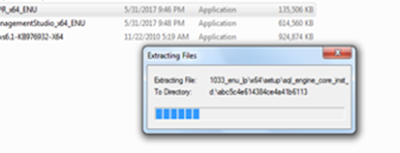
1. Click SqlExpr. This will launch the Sql Server that can be used to install  the sql connection.


   2.This will start running the SQLExpr

 Installation BluePrism


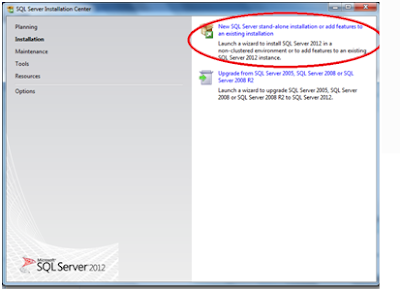
   3. Now click on new connection so that SQL stand-alone gets installed.


 Installation BluePrism


 Installation BluePrism

 Installation BluePrism


 Installation process for Rpa-BluePrism


installation Process for Rpa BluePrism


   4.After all the above steps  we get  Server Configuration in which SQL Server browser gets disable in some systems we need to enable it. 

 Installation process for Rpa-BluePrism


   5. For Sql Connection we are giving windows Authentication so that we can directly connect to sql server after it gets installed.


                  II.            Installation of SQL Management Studio :
   Step 1: First we need to run the SQL Management Studio .


   2.So click on new SQL stand-alone


    3. After all the above steps we need to  enable  local database.


    4. SQL Management studio got Installed.


                             III.            Now we need to install Blueprism.

Step 1: click on Blueprism 5.0.10_x64 BluePrism installation get started.

   
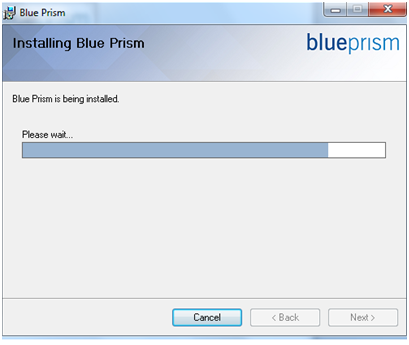
      2. click on next


   3.After all the process Blue Prism gets Installed And This Symbol is showed on your desktop.


Want To Take RPA Online Training visit us

rpaonlinetraining.com suite of self-paced and facilitated online training courses, offered with affordable cost in Hyderabad.


Tuesday, December 12, 2017

Blue Prism Resume For Experienced


Sample Resume for BluePrism Developers 


                                       Name  
                                        Email  
  phone number


Summary                                                                                                  
·         Around 6+ Years of professional experience in various phases of Software Development Life Cycle including Requirements analysis, Applications Design, Development, Integration, automation, Installation, Implementation, Maintenance, Testing, Debugging of various client/server web applications.
·         Worked as a RPA Developer for Banking and Finance sector.
·         Certified in UiPath Development and Orchestration.
·         Working knowledge on Automation Anywhere, Blue prism and UiPath Studio for developing front office and back office robots.
·         Created RPA structure and team along with production support, designed and developed RPA solutions to accelerate Business processes.
·         With Strong willingness and ability to use existing knowledge to rapidly learn how to develop automated processes using Different Tools
·         Highly skilled in RPA - Automation development with the tool AUTOBOT, Automation Anywhere, WINAutomation, Blue prism & UI Path. Requirements Capture, Executing unit test with developed workflow.
·         Worked along with Business Analysts in Automation Projects on a constant basis and worked on it.
·         Created end to end automation solutions for clients as per requirement which involves feasibility study, designing architecture, development, testing and deployment of automation.
·         Experienced in developing Web applications using C#, VB Script, VB.NET, ASP.NET.
·         RPA assessment and Solution designed for a business process.
·          Experience working on Waterfall and Agile Methodologies – Scrum.
·         Strong experience in all phases of the Software Development Life Cycle with Analysis, Design, Development, Implementation, Integration, Testing, Debugging, Production and Maintenance.


·         Strong knowledge and experience in .Net, VB.NET, ASP.Net, MVC, WCF, SQL Server, RPA, and Design patterns with proven abilities in the Software Development Life Cycle (SDLC).
·          Experienced in developing Web applications using VB.NET, ASP.NET.
·         Effectively used UML Diagrams (Behavioral: Use case, Sequence, Activity and Structural: class diagrams), Rational Rose Enterprise Edition, Star UML for developing system architectures.
·         Proficient in developing applications using Object Oriented (OO) programming concepts.
·         Working on Business process diagrams and process flow charts with RPA tools.
·         Hand on experience in Robotic Process Automation (RPA) across different platforms and successful implementation in Production environment.


Interested to take RPA Online Training , contact us  
www.rpaonlinetraining.com
   Flat no: 312, 3rd Floor, NILGIRI Block, Aditya Encalve, Ameerpet, Hyderabad-16
   91-9133347290  
   rpatraining999@gmail.com


Monday, December 11, 2017

Automation Anywhere Interview Questions

Automation Anywhere Interview Questions and Answer For Fresher


What is E-mail Notification?

You can use E-mail notification when you want to be notified that a task has finished running. An e-mail will be sent to the addressed
specified along with the status of the task that was running and few other properties.

What is this 'Email Settings' displayed in the Notification tab in the properties window?

This Button will open up the Options user interface that allows you to set the outgoing mail server, its port number and Exchange
Server authentications, if any. Every mail that you send or receive requires the mail server. You have to obtain this information from
Your Internet E-mail provider or you may obtain it from the configuration section of your e-mail program.

Does your automation software provide any facility to send an email?

Yes, Automation Anywhere provides a command 'Send mail'. You can use this command to send e-mails to anyone. Note that this command
will get information about the e-mail Server, its port number and Exchange Server authentications, if any, from the Mail Setting in
the Options menu every time a task runs.


RPA Online Training is quality reputed Automation Anywhere onlinetraining institute in Hyderabad, India. We have developed proper syllabus structure for both basic and advanced training for Automation Anywhere

Blueprism Interview Question

Blueprism Interview Questions for Begginers

Rpaonlinetraining  is best blue prism training institutes in hyderabad ,we offered real-time knowledge and help individuals and professional to fulfill their dreams

  • 1.In multi calculation stage maximum how many expression we can add?
   Theoretically unlimited

2. What is step-in , step-out and step-over

Step in -one action at a time
Step over-one stage at a time
Step out -one process at a time

3.How to import tiles and dashboard in blue prism?

         Tiles are in built library in blue prism and in dashboard tab we can use tiles and we can make our customized dash.
If the tiles u r importing from another blue prism installation, yes we can.. They can be exposed using Bprelease package and be imported.


4.how can u trigger a process..without scheduling? What are the triggering mechanism available in BP?

U can trigger a process using webservices

5.OCR Tools?

 Google ocr, Microsoft modi, Terasect, and abby
 Changes at uat time
 Deploy as it is and make changes after it is deloyed


6. How to get a screenshot of a application and save it into a word file ? 
   
Open application -->activate application-->navigate(global send keys "[PRTSC]")--->open word       doc --->paste from clipboard...but it is not not working any help......

Get A BluePrism Online Training From RPA Online Training Institute 


Saturday, December 9, 2017

BluePrism Interview Questions


BluePrism Interview Questions

1.How do you use code stage.?
In object studion in Intialize action page just go to properties choose the code options and select the language{ C#.NET}, then drag and drop code stage
      (a)    Inputs : declare the list of inputs
      (b)   Outputs: declare the expected outputs.
       (c)    Code : write a logic to execute.

      2.How do you schedule a Bot?
   Create a schedule in control room , if you want specific calendar for a schedule just you can build in system tab calendar option. After that the schedule report it will generate, open command prompt and run the BP server to trigger schedule .

3.What all are the challenges faced in your process ?

(a)Dymanic text changes while identifaction its identified in runtime its not, applied wildcart match rule.
(b)To read the datatable records faced issues because its unstructured so identified multiple dynamic paths ,and overcome issues.
(C)While interacting with browser based there javascript functions to raise key strokes used “Global SendKey events”.]

(d) While working with browser based application there is no button or link if I click on enter manually in that page it is redirected to new page through automation its difficult ,then we used concept called as “ Global Send Key “ {Enter} to the application modular

Rpa online Training


4. What is Session management?
         Session management will provide
(a)   Available resources
(b)   Available processes.
(c)    Environment.
You can maintain n number of session for a single process.

5.What is session variables and environment variables?
While declaring data items in process you can choose exposure as “Session variable” so that variable act like a session variable, you can monitor process information while running a session in session variables. Session variables you can maintain multiple and different for different sessions.


You can declare environment variables in system process tab and that variables you can access in process studio while running the process you can change the environment variables. Environment variables are common for all sessions.

Get A BluePrism Online Training From RPA Online Training Institute

For more Questions or more Join Us:
Flat no: 312, 3rd Floor,
NILGIRI Block, Aditya Enclave,
Ameerpet, Hyderabad-16
+91-9704455959,9618245689
rpatraining999@gmail.com


Session Variables and Environmental Variables

WHAT IS SESSION VARIABLE AND ENVIRONMENTAL VARIABLE IN  RPA BLUEPRISM ? Session Variables      Session Variables are specif...