Showing posts with label new. Show all posts

Thursday, December 28, 2017

Automation Anywhere Interviews Questions on Windows Control

Automation Anywhere - Manage Windows Control FAQs

How to use and manage Windows Controls to get check-box or radio button status in Automation Anywhere?

Manage Windows Controls command allows you to work with windows controls like check-boxes and radio buttons. With this command you can find out if the radio button or check box is checked or not. Automation Anywhere supports only standard Windows check-boxes and radio buttons.Click on Manage Windows Control in Task Editor and select the appropriate radio button. Select the window to capture the check box or radio button. The value captured can be assigned to a variable.

Does a task recorded using MWC work in the background?

Yes. A task recorded using MWC works in the background.

Why aren't some controls highlighted when I try to capture them using MWC?


We capture standard Windows control using MWC. Client controls and Java are not supported by MWC. In such cases, controls are not highlighted.


For More Detail about Rpaonlinetraining visit us on:

+91-9133347290
rpatraining999@gmail.com

Thursday, December 21, 2017

Automation anywhere Interview questions on Workflow and trigger command

Interview Question & Answer on Triggers

Can I execute a task based on availability or non-availability of any file, folder, performance or service?

Yes, it is possible to execute a task with Triggers, based on availability or non-availability of any file, folder, performance or service.
There are triggers based on Window (open or close), File (create, delete, renamed or modified), Performance (CPU usage, free disk
Space, process count) and Process and Services.

Is there a way to perform a task when a new email arrives?

Yes. Automation anywhere has a trigger functionality that can perform any task when a new email arrives. You need to set the ‘Email
Message Trigger' on the task.


Interview question & Answer on workflow Design


What is Workflow Designer?

Workflow Designer allows you to create an easy to understand, intuitive graphical representation of a IT or a business processes. Automation anywhere allows any user (Business or IT) to easily create end to end business workflows.

How do I use Workflow Designer?

Open Workflow Designer (Shortcut Ctrl+K). Drag-n-drop the objects from the toolkit to design an entire business process.
Workflow Designer provides four objects to design a Workflow:
l Start
l Run Task
l Condition (IF)
l End

How do I run workflows?

Running a workflow is very easy. Just click on the Run button in the Workflow Designer. The other option is to click on the workflow in
'My Workflow' file in the Task List and click Run.
On running the workflow through the Workflow Designer, it highlights the part of the workflow that is being carried out. Once, the workflow
has completed running, it highlights the complete path taken.


Rpa online Training institute are specialized in offering customized training programs to corporate firms to build their internal technological competencies.

Follow our Blog For more Interview Questions on Robotic Process Automation
www.rpaonlinetraining.com        Ph:-+91-9133347290      Email:-rpatraining999@gmail.com


Tuesday, December 12, 2017

Blue Prism Resume For Experienced


Sample Resume for BluePrism Developers 


                                       Name  
                                        Email  
  phone number


Summary                                                                                                  
·         Around 6+ Years of professional experience in various phases of Software Development Life Cycle including Requirements analysis, Applications Design, Development, Integration, automation, Installation, Implementation, Maintenance, Testing, Debugging of various client/server web applications.
·         Worked as a RPA Developer for Banking and Finance sector.
·         Certified in UiPath Development and Orchestration.
·         Working knowledge on Automation Anywhere, Blue prism and UiPath Studio for developing front office and back office robots.
·         Created RPA structure and team along with production support, designed and developed RPA solutions to accelerate Business processes.
·         With Strong willingness and ability to use existing knowledge to rapidly learn how to develop automated processes using Different Tools
·         Highly skilled in RPA - Automation development with the tool AUTOBOT, Automation Anywhere, WINAutomation, Blue prism & UI Path. Requirements Capture, Executing unit test with developed workflow.
·         Worked along with Business Analysts in Automation Projects on a constant basis and worked on it.
·         Created end to end automation solutions for clients as per requirement which involves feasibility study, designing architecture, development, testing and deployment of automation.
·         Experienced in developing Web applications using C#, VB Script, VB.NET, ASP.NET.
·         RPA assessment and Solution designed for a business process.
·          Experience working on Waterfall and Agile Methodologies – Scrum.
·         Strong experience in all phases of the Software Development Life Cycle with Analysis, Design, Development, Implementation, Integration, Testing, Debugging, Production and Maintenance.


·         Strong knowledge and experience in .Net, VB.NET, ASP.Net, MVC, WCF, SQL Server, RPA, and Design patterns with proven abilities in the Software Development Life Cycle (SDLC).
·          Experienced in developing Web applications using VB.NET, ASP.NET.
·         Effectively used UML Diagrams (Behavioral: Use case, Sequence, Activity and Structural: class diagrams), Rational Rose Enterprise Edition, Star UML for developing system architectures.
·         Proficient in developing applications using Object Oriented (OO) programming concepts.
·         Working on Business process diagrams and process flow charts with RPA tools.
·         Hand on experience in Robotic Process Automation (RPA) across different platforms and successful implementation in Production environment.


Interested to take RPA Online Training , contact us  
www.rpaonlinetraining.com
   Flat no: 312, 3rd Floor, NILGIRI Block, Aditya Encalve, Ameerpet, Hyderabad-16
   91-9133347290  
   rpatraining999@gmail.com


Saturday, November 11, 2017

How Robotic Process Automation (RPA) is interfering with our jobs

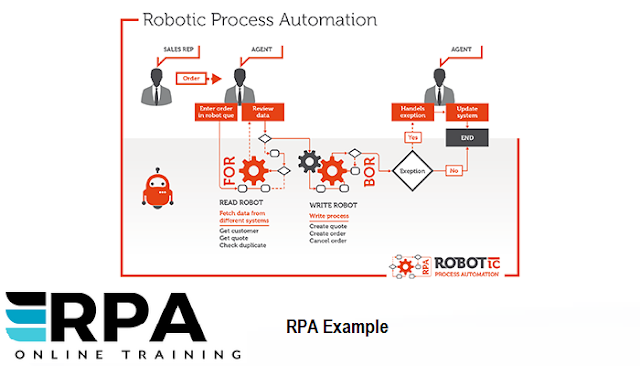
RPA is an acronym for Robotic Process Automation. Robotic process automation (RPA) is the use of software program with artificial intelligence (AI) and machine mastering abilities to manage high-volume, repeatable tasks that formerly needed a human to execute.

www.rpaonlinetraining.comRPA ONLINE TRAINING


RPA Pros:

Improved Efficiency:

By using Different RPA Tools The work efficiency will be increased through robotic process automation.
Greater Productivity:

Technology has got more traffic, as is the case with RPA, the output can be considerably improved. Moreover, knowledge individuals will be liberated up to implement their abilities and encounter more significant projects that drive development and progress.
Elimination of Human Error: 

If human doing work most definitely errors will happen unwantedly to avoiding that we can implement Robotic Process Automation.
Cost Savings:  

If we implement RPA in organizations cost of the projects can be less, because can't do mistakes.


How RPA is different from Business Process Automation:


www.rpaonlinetraining.com


rpaonlinetraining.com is the well-renowned institution providing the best Job-oriented coaching in   RPA. Getting registered with our institutions RPA training which includes Blue Prism Training In Hyderabad. Will definitely assure on developing the best cornerstone for a prosperous profession.


Session Variables and Environmental Variables

WHAT IS SESSION VARIABLE AND ENVIRONMENTAL VARIABLE IN  RPA BLUEPRISM ? Session Variables      Session Variables are specif...